Types, sub-types & templates
Three layers define what an item can be: a broad type, a sub-type that inherits and specializes it, and an optional template that pins names, icons, and forced affixes.
Item types — the broad categories
An ItemTypeDefinition (Assets▸Create▸Item Generator▸Item Type) carries the defaults for a whole category. The example content ships four: Weapon, Armor, Jewelry, Offhand.
| Field | Type | Description |
|---|---|---|
| Base Stat Pool | StatPoolEntry[] | Stats every item of this type rolls (each entry: stat + min–max range). All entries roll — this is not a weighted pick. |
| Implicit Modifiers | StatPoolEntry[] | Always-on bonus rolls, shown separately from affixes. |
| Allowed Stats | StatDefinition[] | Whitelist of stats affixes may grant on this type. Empty = anything. |
| Base Value / Base Durability / Default Max Stack | float / int / int | Economy and durability baselines (defaults 10 / 100 / 1), scaled later by rarity. |
| Default Icon / Default Prefab | Sprite / GameObject | Visual fallbacks when neither sub-type nor template supplies one. |
Sub-types — inheritance with four modes
An ItemSubTypeDefinition (13 ship — from Sword and Grimoire to Ring and Focus) points at a parent type and refines it. How its stat whitelist combines with the parent's is controlled by an InheritanceMode:
| Mode | Description |
|---|---|
| Inherit | Use the parent’s allowed stats verbatim. |
| Override | Replace them entirely with this sub-type’s list. |
| Extend | Parent’s list plus this sub-type’s additions (deduplicated, order kept). |
| Restrict | Parent’s list minus the stats named here. |
Everything else resolves predictably:
| Property | Description |
|---|---|
| Base stat pool | Sub-type override replaces the parent’s pool when non-empty; otherwise the parent’s is used. |
| Implicit modifiers | Additive — the parent’s implicits roll first, then the sub-type’s extras. |
| Value / durability / stack / icon / prefab | Per-field override toggles; anything not overridden falls through to the parent. |
Templates — pinned blueprints
An ItemTemplate fixes identity: base name, description, icon, prefab, item level, and optionally overridden stats, value, stack size, or durability. Templates are also where two powerful knobs live:
| Field | Type | Description |
|---|---|---|
| Forced Affixes | AffixDefinition[] | Always applied, rolled first, and excluded from random duplication — signature stats for signature items. |
| Allowed Rarities | RarityDefinition[] | Which rarities this template may roll at (empty = all). The editor window enforces it; check IsRarityAllowed() in your own drop code. |
| Legendary Effect | LegendaryEffect | Name + description + EffectId. Attached when the rolled rarity allows legendary effects — your gameplay code looks the EffectId up. |
| Item Level | int | Metadata for your own systems — it does not scale any roll; rarity is the only power scalar. |
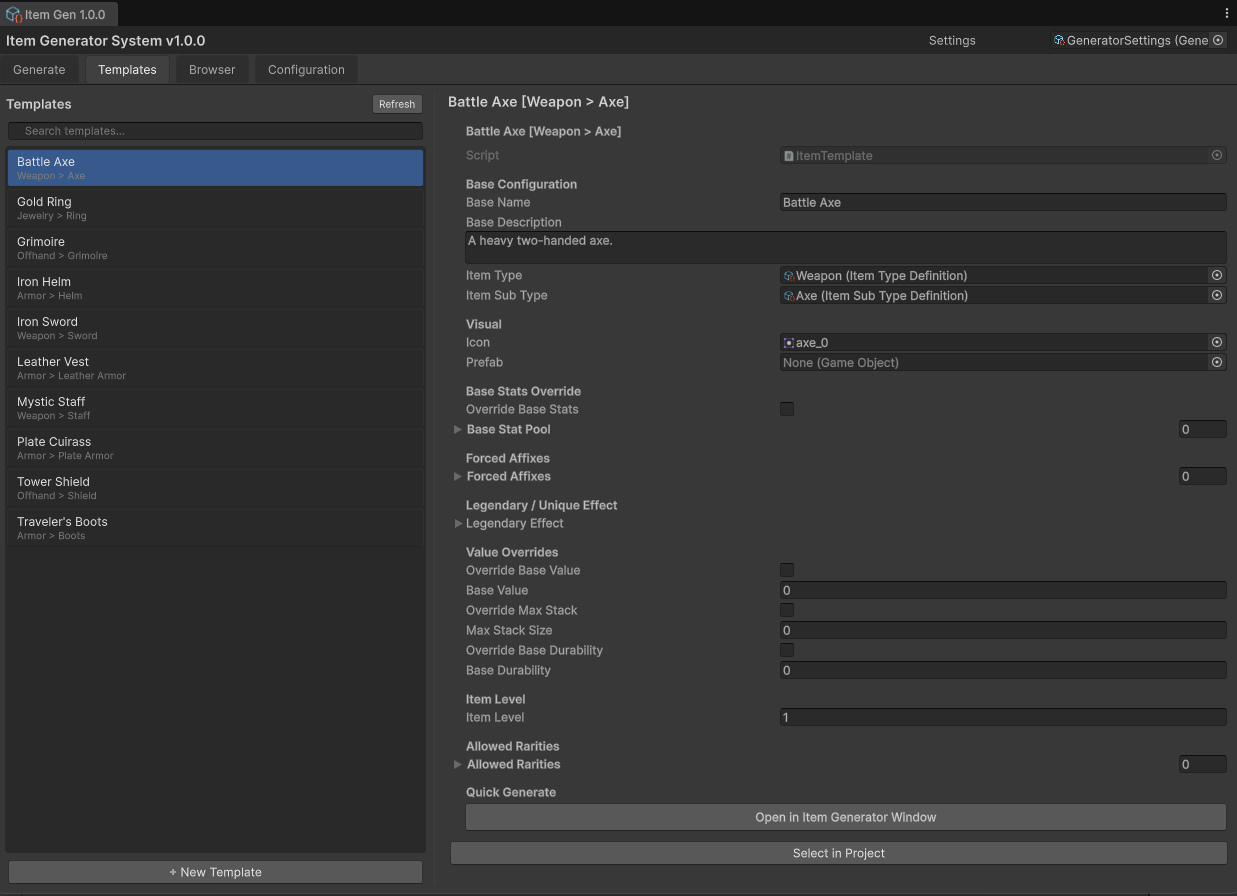
The example set ships 14: ten standard (Iron_Sword, Battle_Axe, Mystic_Staff, Grimoire, Plate_Cuirass, Leather_Vest, Iron_Helm, Travelers_Boots, Gold_Ring, Tower_Shield) and four Unique-only legendaries — Doombringer, Skullsplitter, Stormcaller, Heartwarden — each locked to the Unique rarity with a pre-authored legendary effect.
Stats — the vocabulary
A StatDefinition names one stat (id, display name, value type Flat / Percentage / Multiplier, category). The example content covers 15 — attack, defense, the five attributes, crit chance/damage, attack speed, life on hit, resist, move speed, cooldown reduction, resource regen, and thorns. Rolled values format themselves via StatModifier.GetDisplayString() (e.g. +150 Attack, +12.5% Crit Chance).
1. Create assets:  Assets ▸ Create ▸ Item Generator ▸ (Stat / Rarity / Item Type /
   Sub-Type / Affix / Template / Name Generation Config)
2. Open the window ▸ Configuration tab ▸ "Auto-Discover Content"
   — scans the whole project and registers everything into GeneratorSettings.
3. "Run Validation" lists anything misconfigured, clickable to ping the asset.