Quick start
First in the editor window — no code — then the same generation as three lines of C#.
1 · Generate in the editor
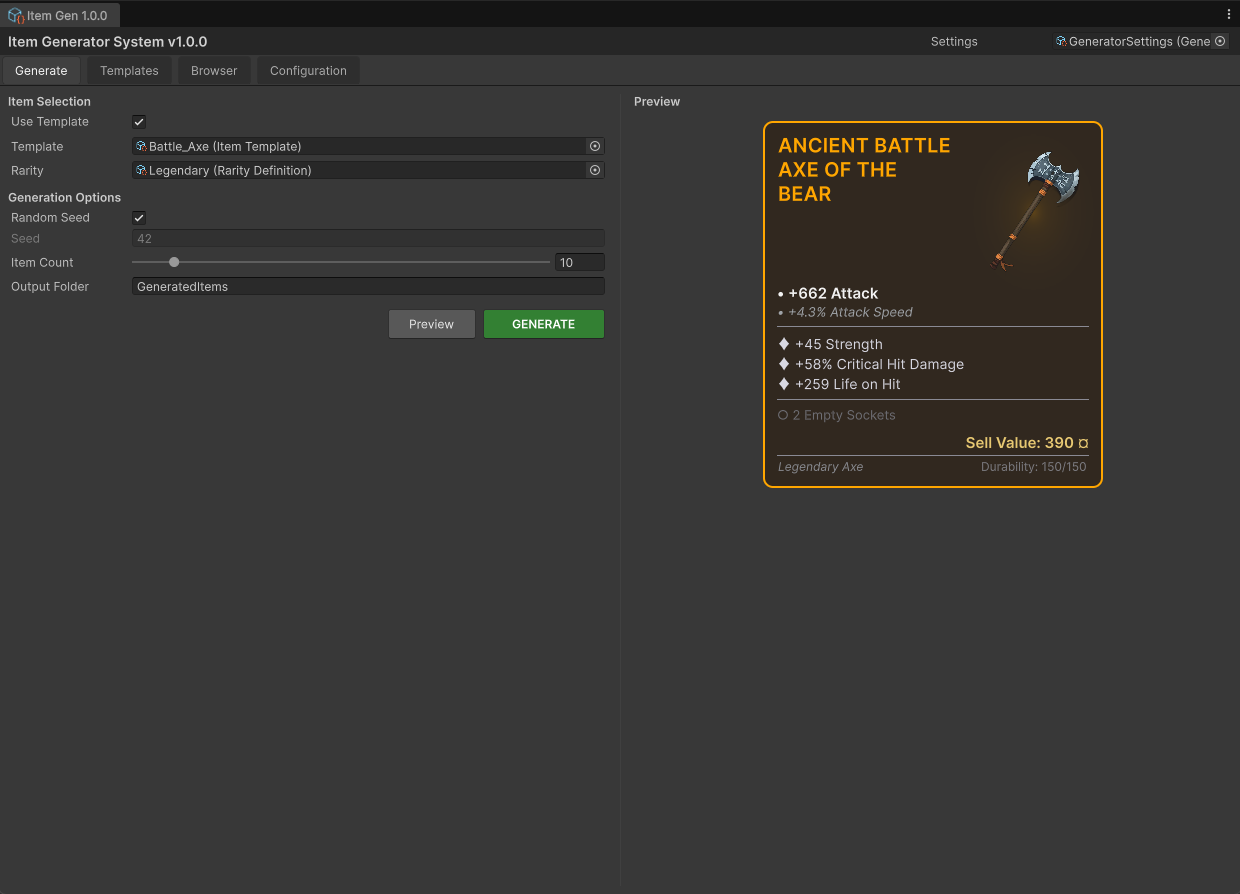
Open Window▸NullBolt▸Item Generator System▸Open Window and stay on the Generate tab. Pick a template (say Iron_Sword) and a rarity (Rare), leave Random Seed on, and click Preview — the right pane renders the finished card. Click GENERATE to save it as an ItemDefinition asset under Assets/GeneratedItems/ (the Item Count slider batches up to 100 at once).
2 · The same thing in code
using UnityEngine;
using ItemGeneratorSystem;

public class LootDrop : MonoBehaviour
{
    [SerializeField] private GeneratorSettings settings;   // wire in the inspector
    [SerializeField] private ItemTemplate template;
    [SerializeField] private RarityDefinition rarity;

    void Start()
    {
        ItemInstance item = ItemGenerator.Generate(new ItemGenerationRequest
        {
            Template = template,
            Rarity   = rarity,
            Settings = settings,
            Seed     = SeedUtility.GenerateRandomSeed(),
        });

        if (item == null) return;   // null on invalid input — no exception

        Debug.Log($"{item.ItemName} — {item.RarityTypeLabel}, " +
                  $"{item.RandomAffixes.Length} affixes, sells for {item.SellValue}");
    }
}
No template? Pass an ItemType (and optionally a SubType) instead. A whole chest is one call: ItemGenerator.GenerateBatch(request, 12) — each item gets its own deterministic seed derived from the request seed.
Settings reference must be wired manually (inspector field or your own loader) — the engine does not auto-load GeneratorSettings from Resources. It holds the affix pool and name config that generation reads.3 · Use the result
ItemInstance is plain data — name, stats, affixes, sockets, sell value, seed. Feed it to your tooltip UI, your inventory, your loot log. Two things to know before you ship:
Persist via snapshots, not raw JSON. The instance holds asset references that don't survive JsonUtility. Capture a tiny ItemInstanceSnapshot instead and regenerate on load — see Saving generated items.
Same seed = same item. Copy the seed from the demo scene's status bar or item.GenerationSeed, plug it into the Generate tab, and you'll get the identical roll — the backbone of both the save system and bug reports. Details in Generating items.