Installation & setup
Import, let the dependency installer and setup wizard do their four steps, and you're generating items in about two minutes.
Requirements
| Requirement | Description |
|---|---|
| Unity | Unity 2022.3 LTS, Unity 2023, or Unity 6 (6000.0+). The automated test suite runs on 2022.3 and Unity 6 before every release. |
| Unity Mathematics | com.unity.mathematics — powers the deterministic, cross-platform RNG. Auto-installed on first import. |
| TextMeshPro | Used by the demo scene's item cards. Auto-installed on 2022.3/2023; on Unity 6 TMP ships inside uGUI, so no separate install happens. |
| Input System | com.unity.inputsystem — the demo scene's UI input module. Auto-installed. |
Demo/ folder is fully deletable.First import — what happens automatically
On first load, a dependency check runs and offers to install any missing packages (Install All / Skip). It never edits your manifest.json silently. You can re-run it any time via Window▸NullBolt▸Item Generator System▸Check Required Packages.
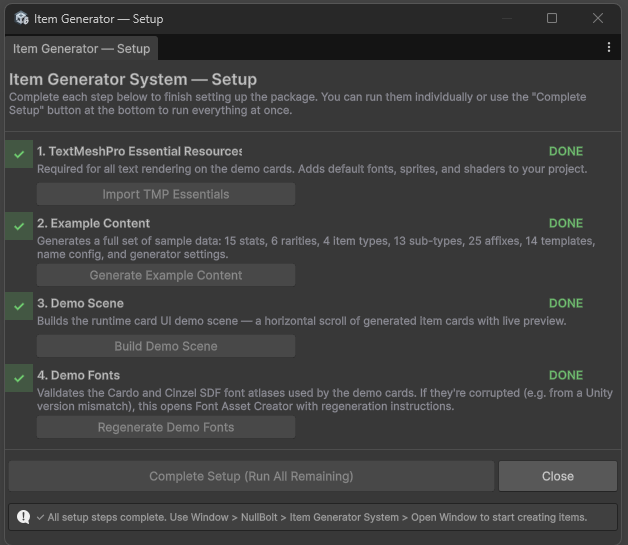
Then the Setup Wizard opens with four one-click steps, each with a DONE/PENDING badge:
| Step | Description |
|---|---|
| 1 · TMP Essentials | Imports TextMeshPro Essential Resources (needed once per project, for the demo cards). |
| 2 · Example Content | 15 stats, 6 rarities, 4 item types, 13 sub-types, 25 affixes, 14 templates, a name config, and the GeneratorSettings asset — the working reference set everything in these docs points at. |
| 3 · Demo Scene | Procedurally builds Demo/DemoScene.unity — dropdowns, generate/chest buttons, card viewport. |
| 4 · Demo Fonts | Rebuilds the SDF font atlases for the demo (Cardo & Cinzel, OFL-licensed). |
Complete Setup (Run All Remaining) runs whatever is still pending, in order. Re-open the wizard any time: Window▸NullBolt▸Item Generator System▸Setup Wizard.
Folder layout
ItemGeneratorSystem/
├── Demo/               Demo scene, card UI, fonts — safe to delete
├── Documentation~/     PDF manual (excluded from builds)
├── Editor/             4-tab window, wizard, inspectors, content generator
├── ExampleContent/     Stats, Rarities, ItemTypes, SubTypes, Affixes,
│                       Templates, Icons + GeneratorSettings & NameConfig
├── Runtime/            The engine — Core, Configuration, Generation,
│                       ItemTypes, NameGeneration
└── README / CHANGELOG / TESTING / LICENSEAssets/.Verify the install
Open Window▸NullBolt▸Item Generator System▸Open Window, pick a template and a rarity on the Generate tab, and hit Preview — a finished item card should render on the right. If it does, everything works. For the runtime view, open Demo/DemoScene.unity and press Play.