Editor windows
Everything lives under one menu root: Window ▸ NullBolt ▸ Inventory System. This page is the tour.
The menu map
| Menu entry | Description |
|---|---|
| Welcome | Launcher hub — opens once automatically after import/update. |
| Item Tools | The Item Creator + Item Browser, docked as one tabbed workspace. |
| Create / … | Five one-shot generators (no dialogs — they build straight into the open scene): Grid Inventory, Slot Inventory, Hotbar, Equipment Panel, Cross-Type Demo. |
| Demo Scenes / … | Four builders that write complete .unity files into Examples/. |
| Scene Tools / … | Additive utilities for a scene you already have open. |
Welcome window
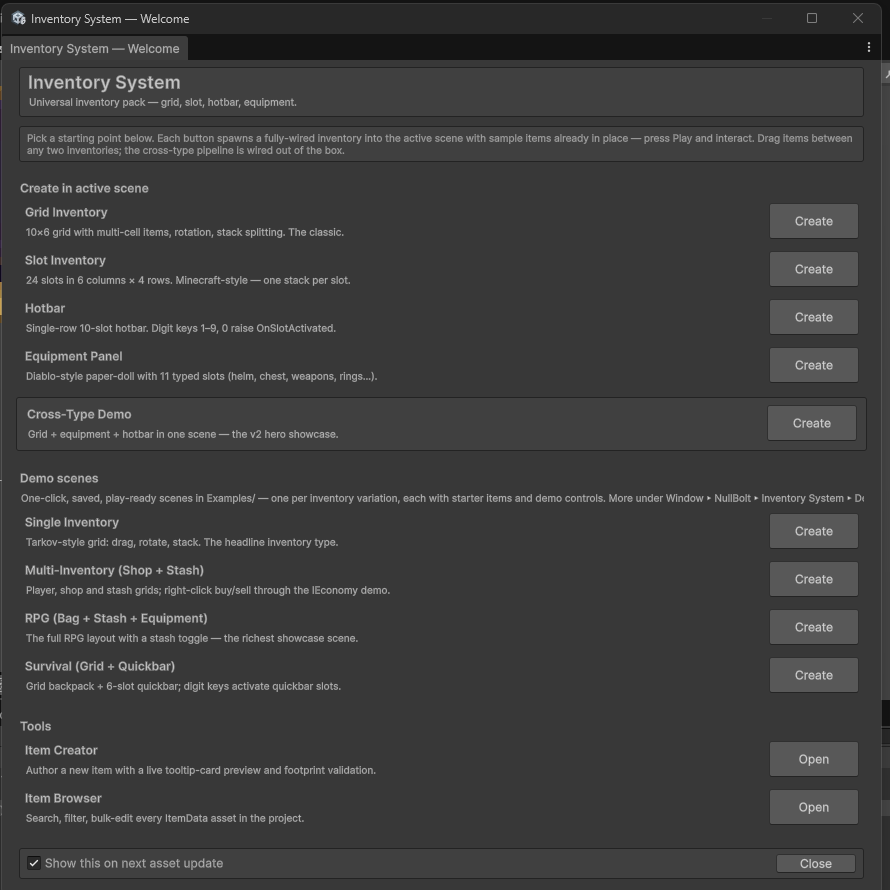
Window▸NullBolt▸Inventory System▸Welcome — a launcher listing every generator, demo scene builder, and tool with a one-line description and an action button, so nothing has to be hunted down in menus. It opens itself once per machine after import (and once more per major update); the "Show this on next asset update" toggle at the bottom opts out.
Item Tools — Creator & Browser
Covered in depth in Items & the Item Creator: author items with a live tooltip-card preview, browse and bulk-edit every item in the project, and (with our Item Generator System installed) import generated items straight into the form.
In-scene generators (the Create menu)
The …▸Create entries are one-shot commands — no window opens. Each spawns a fully wired inventory into the open scene: Canvas and EventSystem included if missing, sample items pre-placed, everything selected and ready to restyle. Each spawn is a single Undo step and nothing is saved until you save the scene.
| Generator | Description |
|---|---|
| Grid Inventory | 10×6 grid with styled panel art and five sample items. |
| Slot Inventory | 24 slots in a 6×4 layout. |
| Hotbar | 10 slots, single row, digit keys pre-wired. |
| Equipment Panel | 11-slot anatomical paper-doll with ghost silhouettes per slot type. |
| Cross-Type Demo | The showcase: grid + equipment + hotbar in one Canvas, drag-compatible out of the box. |
Demo scene builders
The …▸Demo Scenes entries build complete, saved, play-ready scenes into Examples/ (asking before overwriting). They're regeneration tools for the four shipped demos — broke a demo while experimenting? Rebuild it in one click, or use a builder's output as the starting point for your own layout. The scenes themselves are covered in Demo scenes & controls.
Scene tools
| Tool | Description |
|---|---|
| Add Hotbar Showcase To Open Scene | Drops a wired 10-slot hotbar with starter items plus an activation-feedback label into whatever scene is open — the quickest way to feel OnSlotActivated. |
| Add 'One of Each' Button To Open Scene | Adds a demo button that spawns one of every sample item (requires a scene with a DemoManager, like the Multi-Inventory demo). By default it excludes the Tactical set from fantasy scenes. |
Custom inspectors that fix things
The inspectors don't just warn — most problems come with a one-click, undoable auto-fix:
| Check | Description |
|---|---|
| Missing GridUI | InventoryController without its GridUI reference → error box + "Add GridUI on this GameObject". |
| Missing EventSystem | Any controller in a scene with no EventSystem → warning + auto-fix (Input-System-aware). |
| Not under a Canvas | Warning when a controller sits outside any Canvas (no auto-fix — it won’t guess which Canvas you meant). |
| Hotbar sanity | Base Slot beyond Slot Count → error + reset; digit keys overflowing the slot count → warning. |
| Empty equipment | EquipmentController with no slots → one click adds the standard 11-slot loadout. |
| ItemData footprint | The ItemData inspector paints the footprint grid, previews the icon, shows the rarity swatch, and warns on rotatable+stackable conflicts — see Items. |
NullBolt/InventorySystem anywhere under Assets/ and the generators, builders, and default folders keep working.