Equipment & hotbar
A typed paper-doll for RPG loadouts and a hotbar that turns digit keys into gameplay events. Both accept drag-and-drop from any other inventory.
The equipment paper-doll
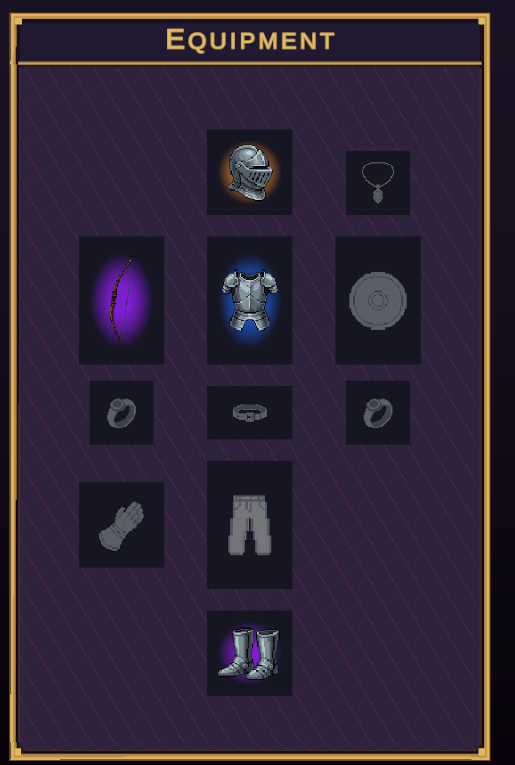
EquipmentController manages a list of EquipmentSlot children, each declaring which slot types it accepts. Drag a helm from the bag onto the helm slot and it equips; drag it onto the boots slot and it snaps back. The fastest way to get one is Window▸NullBolt▸Inventory System▸Create▸Equipment Panel in Scene — an 11-slot anatomical layout (helm, amulet, chest, gloves, main/off hand, belt, two rings, legs, boots) with ghost silhouettes per slot.
| Validation rule | Description |
|---|---|
| Typed slots | A slot lists its accepted EquipmentSlotTypes; an item declares one via ItemData.EquipSlot. Equipping requires a match, an empty slot, and IsEquippable. |
| 15 slot types | None, Helm, Chest, Legs, Boots, Gloves, Shoulders, Cloak, MainHand, OffHand, Ring1, Ring2, Amulet, Belt, Trinket — stable ints, safe to persist. |
| "Any ring" slots | A slot may accept several types — list both Ring1 and Ring2 on one slot and either ring fits. |
using InventorySystem;

equipment.Equip(helmData);          // first matching empty slot
equipment.EquipAt(ringData, 7);     // a specific slot index
equipment.Unequip(7);

equipment.OnItemEquipped   += (item, slotType) => RecalculateStats();
equipment.OnItemUnequipped += (item, slotType) => RecalculateStats();
OnItemEquipped/OnItemUnequipped and apply your own stat logic there.Rendering is handled by EquipmentPanelUI in one of two modes: LabeledList auto-generates a label + slot row per entry (zero layout work), while Free binds pre-placed slot visuals for full paper-doll layouts — that's what the Create menu generates.
The hotbar
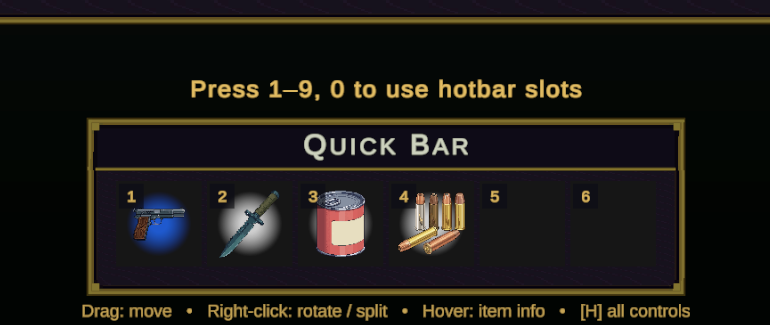
HotbarController extends the slot inventory with digit-key input: 1–9 map to the first nine slots and 0 to the tenth (offset by Base Slot if set). Slots within key range get a small gold key chip in the corner automatically. Activating a slot — by key or by left-click — raises one event:
using InventorySystem;

hotbar.OnSlotActivated += (slotIndex, item) =>
{
    if (item == null) { Sfx.Play("empty_click"); return; }   // empty slots still fire

    switch (item.ItemData.Category)
    {
        case ItemCategory.Consumable: Drink(item);  break;
        case ItemCategory.Weapon:     Wield(item);  break;
    }
};
| Member | Type | Description |
|---|---|---|
| ActivateSlot(int) | bool | Trigger a slot from your own input code (gamepad, rebindable actions). Returns false when out of range. |
| ListenForNumberKeys | bool | Disable the built-in digit polling entirely and drive activation yourself. |
| BaseSlot | int | Offsets which slot the “1” key targets — useful for multi-row bars. |
ActivateSlot from your own input handling instead. Try it instantly with Window▸NullBolt▸Inventory System▸Scene Tools▸Add Hotbar Showcase To Open Scene.Cross-inventory drag, for free
Grid, slots, hotbar, and equipment all implement IInventory, and every drag handler routes through the same transfer pipeline — so bag→hotbar, bag→equipment, stash→bag, and equipment→shop drags all work with no configuration. Failed transfers roll the item back to where it came from.